

GPS arrival tracking and geofence alerts for fleets, field crews and security patrols

Know when your crew arrives. Act before it costs you.

You mark places on the web dashboard. Drivers, techs or guards run the free app on their own phones while on shift. Every visit is timed, and when a stop runs late or long, your rule sends the email or Slack post. Texts go through your own Twilio account.

Free for up to 5 phones. No credit card. Driver, tech or guard? Get the app

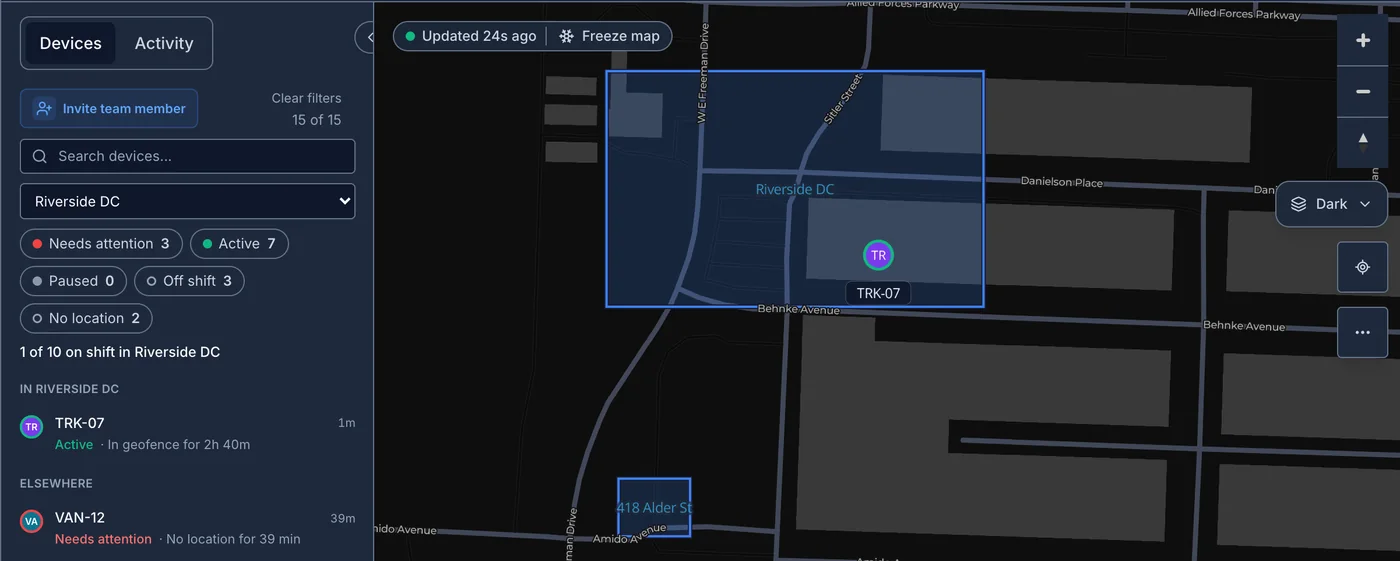
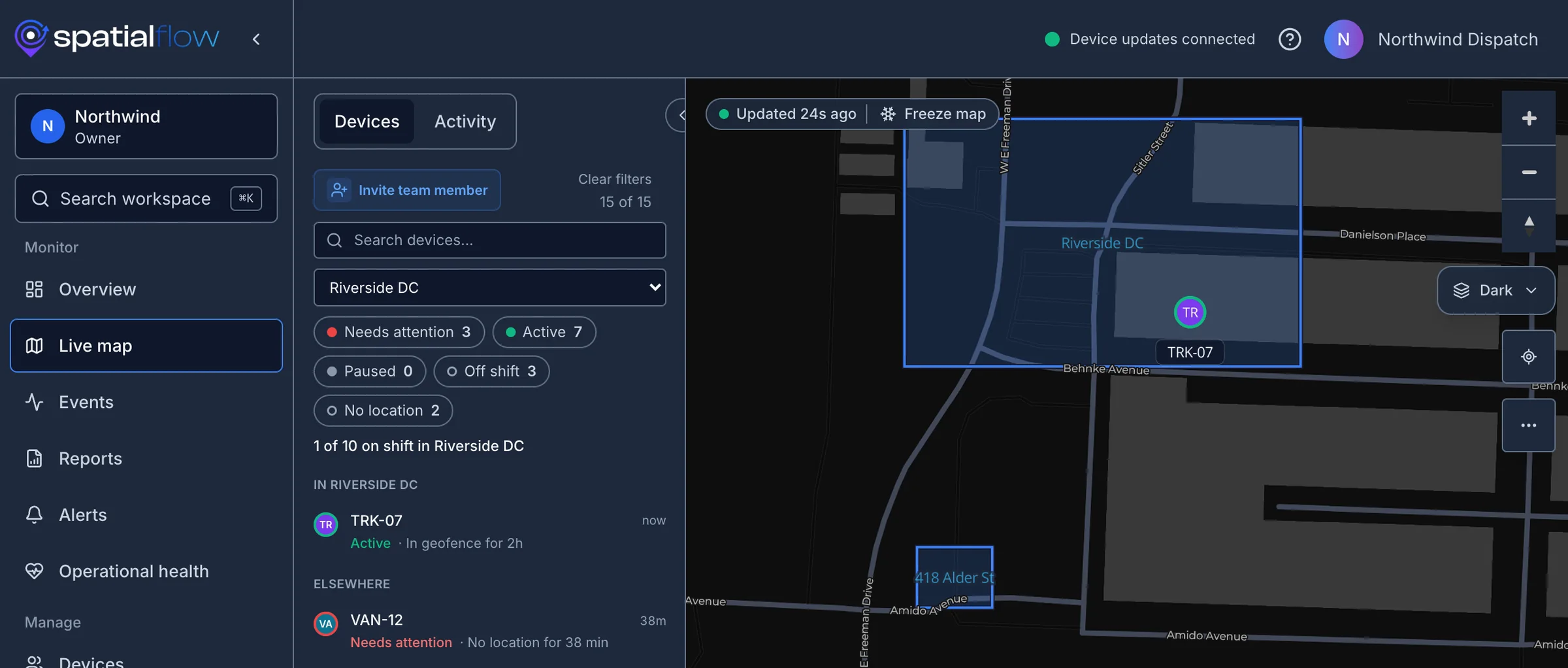
The email the rule sent. From: SpatialFlow, To: billing@northwind.example, Subject: Detention started: TRK-07 at Riverside DC.The SpatialFlow app's live map in the Northwind demo workspace, with Riverside DC picked and TRK-07 listed as Active, In geofence for 2h.
Real screens from a demo workspace: the live map, and the email the Detention clock rule sent.
  • Free plan
  • iOS and Android
  • No hardware
  • Tracking only on shift

Your crew installs the free app:

Download on the App StoreGet it on Google Play

One rule, three kinds of crew

Draw a geofence around a place that matters. When a phone on shift crosses it, SpatialFlow writes it down and runs the rule you set. No code, no hardware.

The distribution center in the model city: truck TRK-07 backed into dock 4 inside the amber Riverside DC geofence, its tag reading 2h 00m at Riverside DC.

Workflows

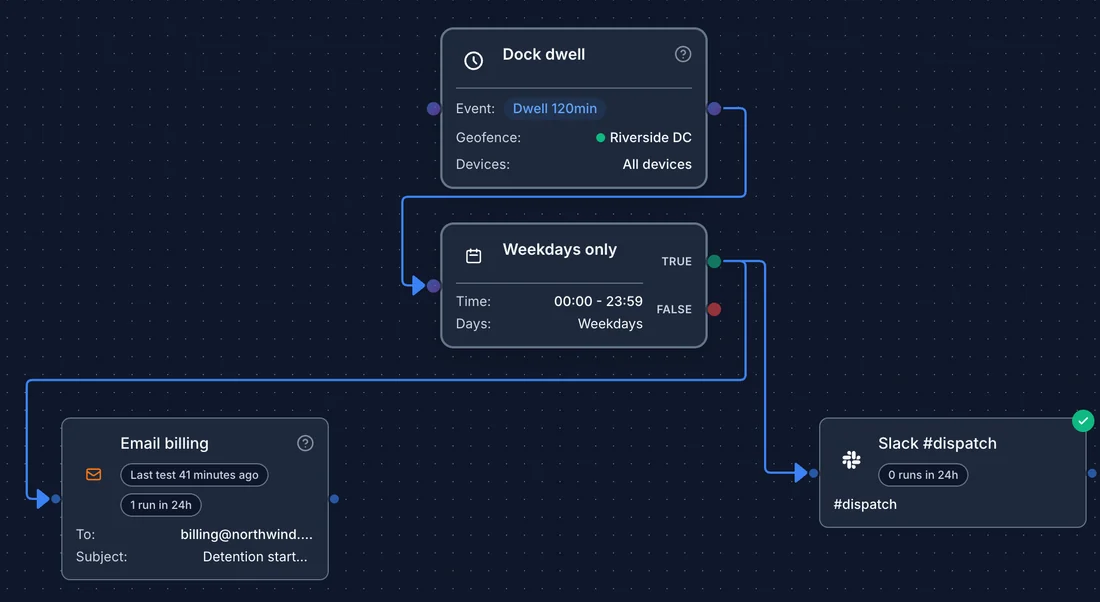
Detention clock Riverside DC · dwell over 2h → Email billing@ · Post to #dispatch

Sent · billing@ · #dispatch

Workflows

Detention clock

  1. When

    Riverside DC · dwell over 2h

  2. Only

    Mon to Fri

  3. Then

    Email billing@TRK-07 has been at Riverside DC for 2h 00m as of 09:32.

  4. Then

    Post to #dispatchFree time is up for TRK-07 at Riverside DC.

    Simulated city. Events, workflows and records mirror real SpatialFlow features.

    Detention you can prove

    Draw a geofence around each shipper and receiver. The driver's phone stamps arrival and departure without a check call. When a truck passes your free time, SpatialFlow emails your billing desk the dwell time and posts to dispatch.

    GPS timestamps from the driver's phone back up a detention claim. Your rate confirmation and signed BOL still decide what gets paid.

    The American Transportation Research Institute found that 94.5 percent of carriers charge detention, but they end up paid for fewer than half of their detention incidents. ATRI, September 2024

    Send me a sample detention reportTry the detention pay calculator
    1. WhenRiverside DC · dwell over 2h
    2. OnlyMon to Fri
    3. ThenEmail billing@ · Post to #dispatch
    07:32  TRK-07  entered Riverside DC
    09:32  TRK-07  passed 2h  → billing@ emailed
    10:21  TRK-07  left · on site 2h 49m
    The Detention report for TRK-07 at Riverside DC: $61.25 owed at $75.00 an hour over 120 minutes of free time, and 49m over free time.
    Detention report for TRK-07 in a demo workspace.
    The SpatialFlow mobile app on a worker's iPhone: My Day with a green Tracking on card, the route into and out of the Riverside DC geofence on a small map, today's visits listing a departure from 418 Alder St and an arrival at and departure from Riverside DC, and Pause and Stop buttons.

    The worker holds the switch

    Location is collected while a shift is on and stops when it ends. That's the deal your crew signs up for, and the app makes it visible the whole time.

    • Starts with the shift. Workers start, pause and end tracking from their own phone. Managers can't switch it on for them.
    • Works without signal. Up to a day of points waits on the phone and uploads when coverage comes back, marked with the time each was recorded.
    • Honest about gaps. A phone that goes quiet mid-shift is flagged unless it reported itself parked, and the map draws its last known position with the time since it last reported.
    • Less to report by hand. Arrivals and departures at your geofences fill the worker's list of today's visits on their own, and a shift note they add lands on the shift, where the office reads it alongside the route.
    • Needs attentionon shift and silent for 15 min unless parked, or an overdue or stuck alert
    • Activeon shift and reporting, or parked
    • Pausedthe worker paused tracking
    • Off shiftnot on a shift, not sharing
    • No locationapp installed, no fix yet

    The ops center is a browser tab

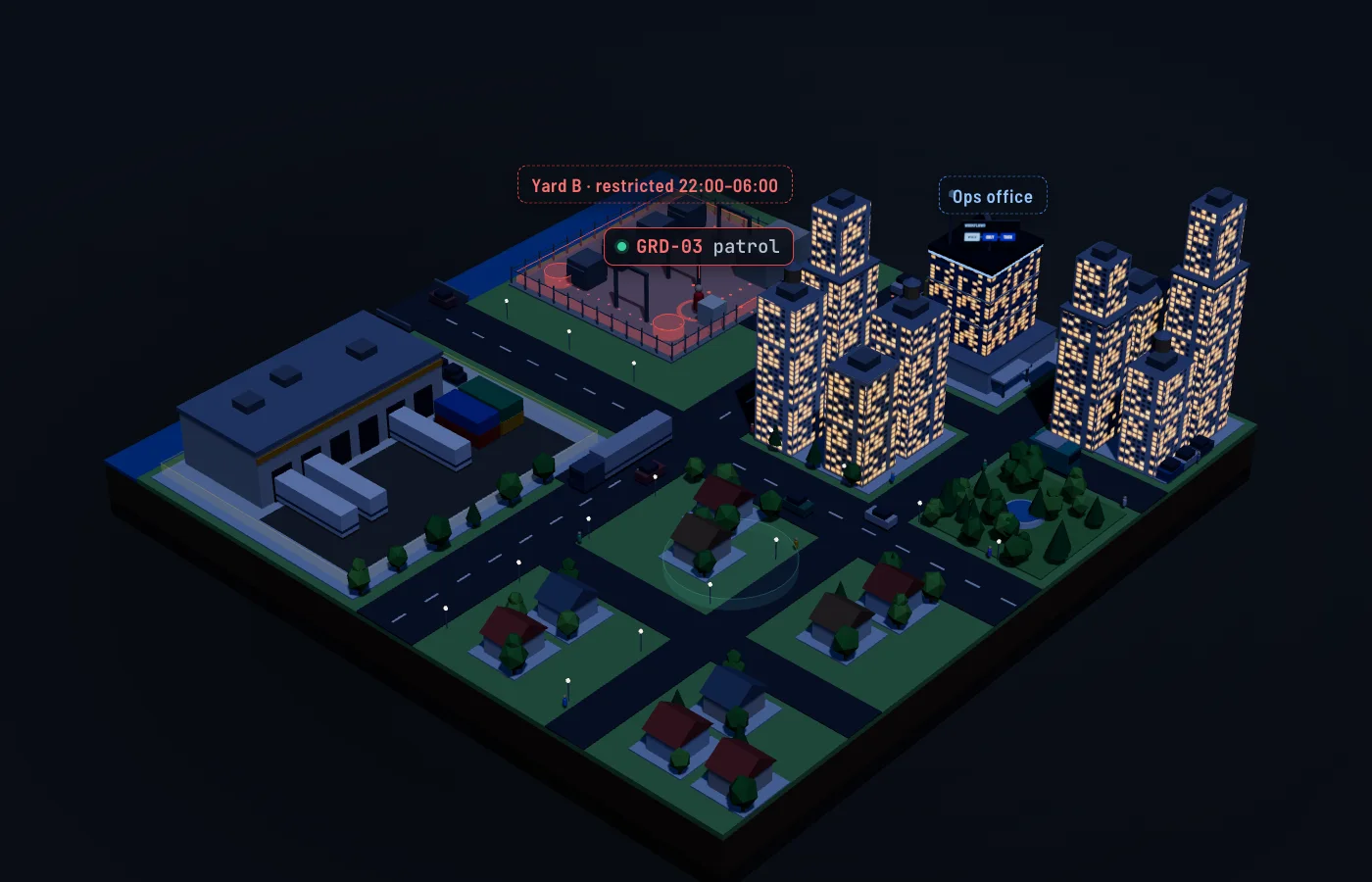
    The city is a model. These screens are the product that runs it, with a demo workspace set up like the city: the live map and device list, the workflow builder, the Detention report and a shift replay.

    SpatialFlow live map with the Riverside DC geofence selected: the device list shows 1 of 10 on shift there, TRK-07 Active, In geofence for 2h 40m, and VAN-12 marked Needs attention after 39 minutes without a location. The truck's marker sits inside the Riverside DC geofence on the map.
    Live map: who is in each geofence, and who has gone quiet
    The workflow builder showing the detention rule: a 120-minute dwell trigger on Riverside DC, a weekdays-only condition, then an email to billing and a Slack post to #dispatch.
    Workflow builder: the detention rule, no code
    The Detention report for Riverside DC: $336.25 owed at $75.00 an hour over 120 minutes of free time, 4h 29m over free time across 8 stops, 1 still on site.
    Detention report: time over free time, priced, with CSV export
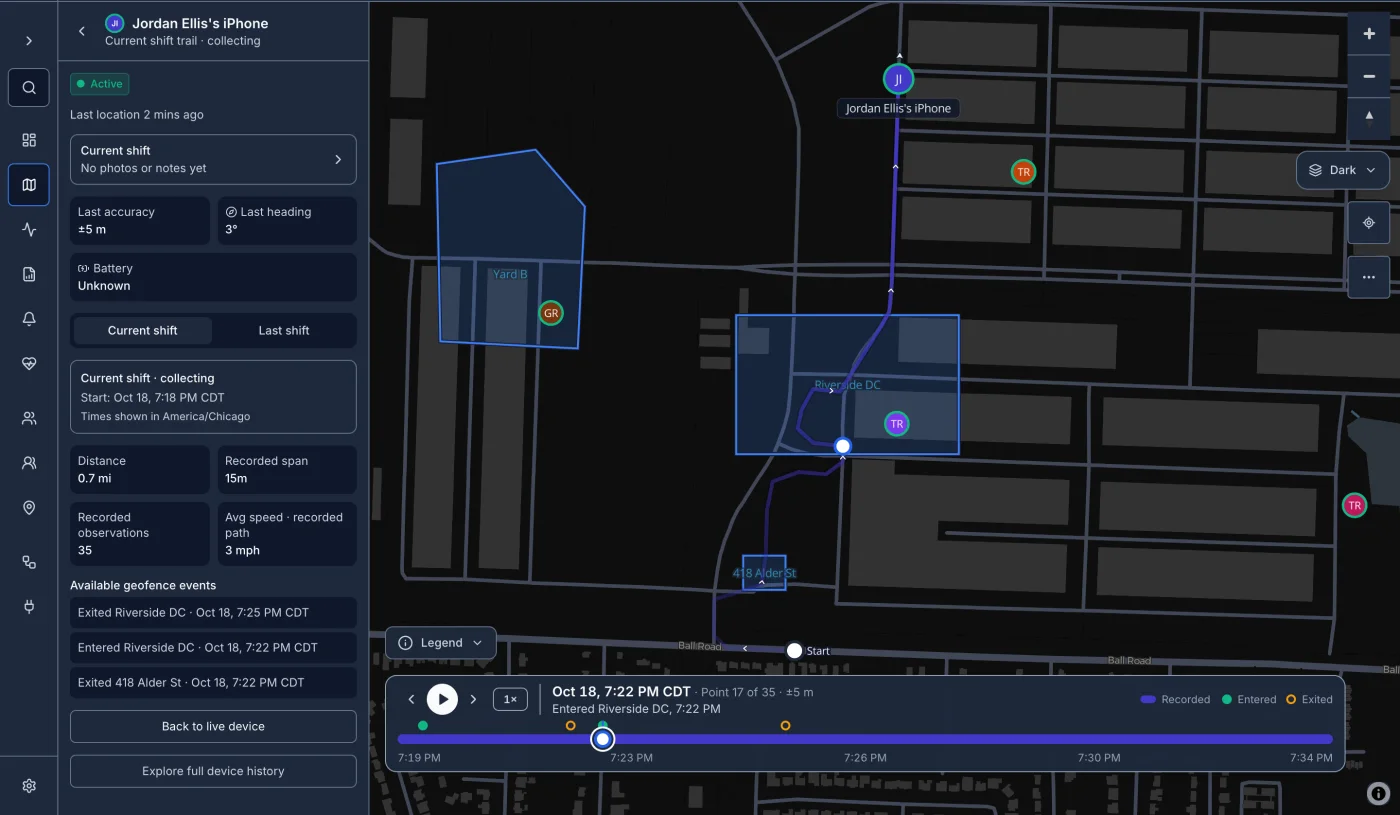
    The live map replaying a driver's shift: the route from the start on Ball Road through the 418 Alder St and Riverside DC geofences, playback paused at Entered Riverside DC 7:22 PM on a timeline that marks each entry and exit, and the shift's distance, recorded points and geofence events in the side panel.
    Shift replay: the route, each arrival and departure, on a timeline

    Replay the current or last shift

    Step through a driver's shift point by point: where they went, when they reached each geofence and when they left. Older shifts keep their trail and CSV export on the device's page for as long as your plan keeps location history.

    Sends to Email · SMS and Slack through your own accounts · Microsoft Teams · Discord · Webhooks

    Builds on REST API · signed webhooks · Go, Node and Python SDKs · docs

    Check our work before you trust it

    Look before you sign up

    Your data, your rules

    • Encrypted in transit and at rest
    • Workspace roles decide who sees what
    • Location history kept for 30, 90 or 180 days by plan, with an erasure API
    • Self-managed in your own AWS account, by arrangement · talk to us

    What it won't do

    • Track anyone who isn't on shift
    • Show a stale point as live
    • Replace your BOL or contract terms in a billing dispute

    Start free. Pay when the crew grows.

    Free

    $0

    A couple of trucks or techs, to see if it fits.

    • 5 phones or devices
    • 10 geofences
    • 2 active workflows
    • 30 days of history
    Start free

    Team

    $129/month

    Up to 40, for a bigger crew. $1,290 a year.

    • 40 phones or devices
    • 300 geofences
    • 15 active workflows
    • 90 days of history
    Start free, upgrade later

    Business

    $249/month

    Up to 100, with longer records. $2,490 a year.

    • 100 phones or devices
    • 750 geofences
    • 25 active workflows
    • 180 days of history
    • SAML single sign-on, domain verified with our help
    Start free, upgrade later

    Every plan starts free. Bigger crew or a signed agreement? Talk to us.

    Questions crews ask first

    Does it drain the phone battery?

    It uses GPS, so it uses battery while a shift is on, and none when the shift is off. On Android it asks to be exempt from battery optimization so the phone doesn't stop it mid-shift.

    What does the worker have to do?

    Accept the invite, allow location, and tap Start tracking. That's it. They can pause or stop tracking from the same screen.

    What happens with no signal?

    The phone keeps up to a day of points (or 10,000 of them) and uploads them when coverage returns, each with the time it was recorded.

    Does it work with our ELD?

    Not directly. SpatialFlow uses the driver's phone, or any device or system that can post locations to the API.

    Our ELD already logs arrival times. What does this add?

    Action when free time runs out. When a driver's phone passes free time at a geofence, a rule can email billing, post to Slack or Teams, text the dispatcher through your Twilio account, or call a webhook into your TMS. The Detention report does the rate math and exports CSV.

    Will a broker accept it?

    It gives you timestamped GPS evidence of arrival and departure and does the detention math. That supports a claim; your rate confirmation and BOL still decide what gets paid.

    What does setup involve?

    Draw geofences on the map, write the rules, and invite the crew by email or QR code. There's no hardware to install.

    Can it feed our dispatch or billing software?

    Yes. Workflows can call webhooks, and everything is available through the REST API and SDKs.

    Put your crew on the map today

    Draw a geofence around one receiver, invite one driver, and watch the first arrival land on the record.

    The model city at night with lit windows and the ops office glowing blue.